There are three options :Upload images, Select Aspect Ratio, and Properties
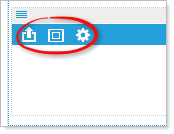
 Upload: Upload HTML5 compliant video formats - mp4, webm, or ogv.
 Set aspect ratio: Select 4:3, 3:2, or 16:9 (HD). This will set the frame size for your video. You can also manually set the frame size in the Media Player Settings.
 Properties: Choose a style – Media Player, or Media Player with playlist. Or link to an external video.
Choose “Media Player” to view an uploaded video or link to an external
video, Example: http://youtu.be/GqlEnnSGwlA .
Choose “Media Player with playlist” and enter a link to a YouTube playlist.
Example: PL2HUH5okl73JFq_QDyqVq9GCZ0Dd9L0OH .
Also choose to 'Auto start media player'.
Note: Linking to an external video or play list will supersede your uploaded video. Remove the link and the local uploaded video will play.